Introduction
Building websites and web applications has traditionally required programming knowledge, experience with frontend and backend technologies, and familiarity with deployment platforms. For many beginners, entrepreneurs, and small business owners, this learning curve often became the biggest obstacle to turning an idea into a working product.
Over the last few years, AI-powered development tools have started changing this process. Instead of writing hundreds of lines of code manually, users can now describe their ideas in plain English and allow AI to generate a significant portion of the application. This approach helps reduce development time, making software creation more accessible to people with different skill levels.
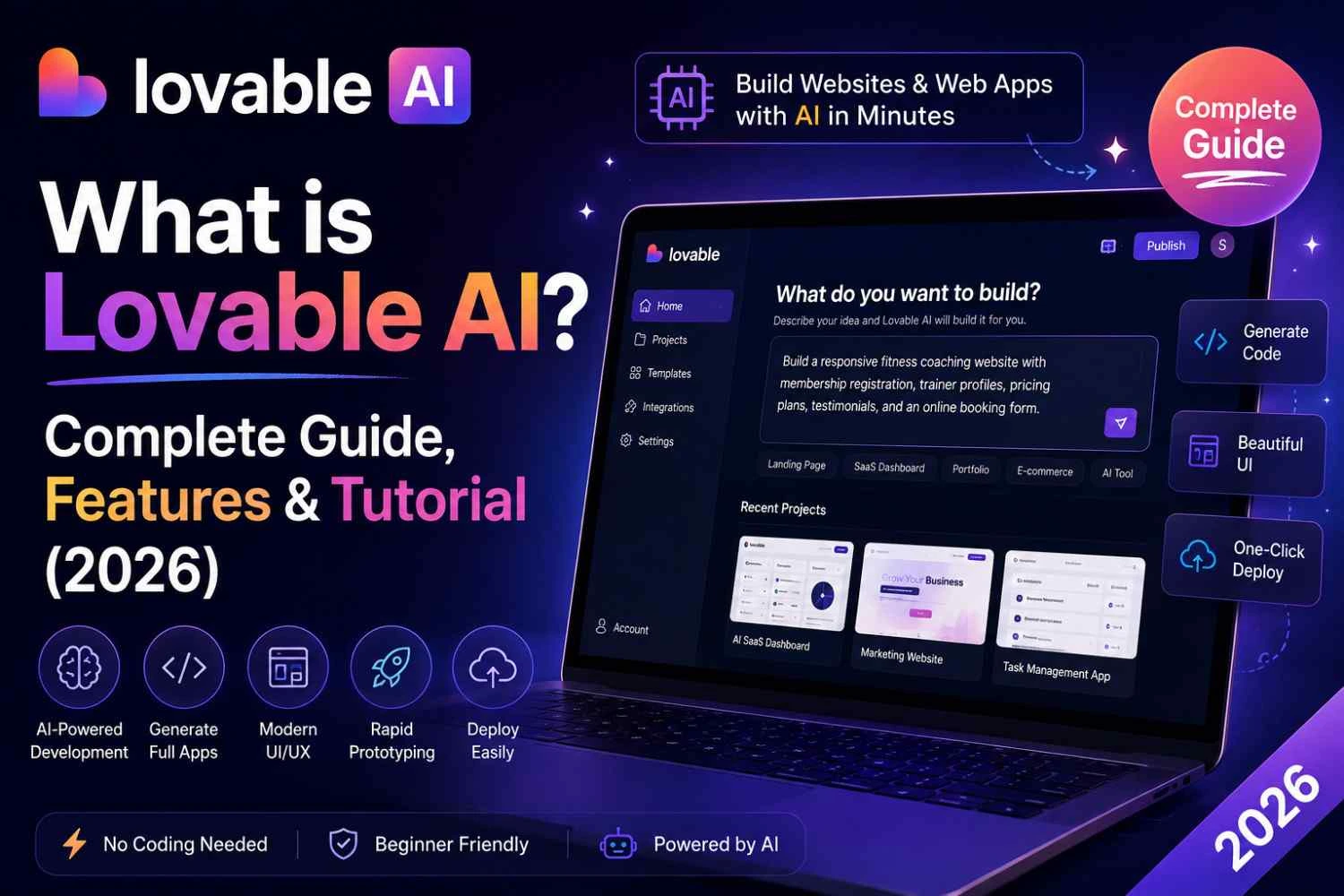
One platform attracting significant attention in this space is Lovable AI. Rather than functioning as a simple AI chatbot, Lovable AI focuses on helping users build modern web applications using natural language prompts. Whether you're creating a landing page, an internal business tool, a customer portal, or a startup prototype, the platform aims to convert your instructions into working code that can be edited, tested, and deployed.
However, many people still have important questions before trying the platform:
- What exactly is Lovable AI?
- Can beginners use it without coding experience?
- Does it generate production-ready applications?
- Is Lovable AI free?
- How does it compare with tools like Bolt.new, v0.dev, Cursor AI, and Replit AI?
- Is Lovable AI suitable for building applications for clients and commercial projects?
This guide is designed to help you understand Lovable AI from the ground up. You'll discover how the platform operates, explore its major capabilities, learn where it performs well, identify situations where it may fall short, and see how it compares with other AI development tools available in 2026. By the end, you'll have enough information to decide whether it fits your personal projects, business requirements, or professional development workflow.
Quick Summary
| Feature | Details |
|---|---|
| Platform | Lovable AI |
| Category | AI Website Builder & AI App Development Tool |
| Best For | Beginners, Developers, Freelancers, Startups |
| Primary Function | Generate web applications from natural language prompts |
| Coding Required | Helpful but not always mandatory |
| Supports | Frontend development, UI generation, API integration, application prototyping |
| Learning Difficulty | Beginner to Intermediate |
| Free Plan | Available with usage limitations |
| Ideal Projects | Startup MVPs, client websites, SaaS applications, admin dashboards, business portals, internal management tools, and rapid prototypes |
Table of Contents
- What is Lovable AI?
- History of Lovable AI
- Who Created Lovable AI?
- How Lovable AI Works
- Architecture Overview
What is Lovable AI?
Rather than starting with an empty code editor, Lovable AI allows you to describe an application idea in everyday language. The platform interprets your request and generates a working foundation that may include user interfaces, project structure, reusable components, and application logic, giving you a faster starting point for development. Instead of manually coding every interface element or writing complex application logic from scratch, users interact with the platform through prompts, and the AI generates project components based on those instructions.
Unlike traditional website builders that rely mainly on drag-and-drop interfaces, Lovable AI is designed around an AI-assisted workflow. A user might type a request such as:
"Create a modern restaurant booking website with online reservations and a contact form."
The platform analyzes this request and begins generating a structured project that may include layouts, navigation, reusable UI components, forms, and supporting code. Users can then refine the result through additional prompts or manual edits.
One important point to understand is that Lovable AI is not a replacement for software engineering knowledge. Instead, it acts as a productivity tool that accelerates many repetitive development tasks. Developers can use it to prototype ideas more quickly, while beginners can use it to understand how modern web applications are structured.
Because of this balance between automation and human control, Lovable AI has become attractive to startups, freelancers, agencies, educators, and entrepreneurs looking to shorten development cycles without sacrificing customization.
History of Lovable AI
As conversational AI became more capable of understanding detailed instructions, software development tools also began to evolve. Instead of assisting with individual code snippets, newer platforms started helping users generate complete application foundations directly from written descriptions, making development faster and more accessible. As developers became comfortable using AI assistants for writing code, the next logical step was creating tools that could generate complete application structures instead of isolated code snippets.
Lovable AI emerged during this shift toward AI-assisted software development. Its goal was to simplify the process of transforming ideas into working applications by combining conversational prompting with modern web development practices.
Rather than focusing only on code completion, the platform emphasizes end-to-end project creation. This includes interface generation, project organization, iterative improvements, and collaboration between human developers and AI. As AI models became more capable, platforms like Lovable AI evolved from experimental productivity tools into practical solutions for building prototypes, business applications, and customer-facing websites.
Today, Lovable AI is part of a growing ecosystem of AI-powered development platforms that are changing how individuals and teams approach software creation.
Who Created It?
Lovable AI was developed by the team behind the Lovable platform, whose mission is to make software creation more approachable through AI-assisted development. The platform combines advances in large language models with modern web technologies to help users generate applications using conversational prompts instead of relying solely on manual programming.
Rather than targeting only experienced software engineers, Lovable AI is designed for a broader audience that includes entrepreneurs, designers, freelancers, startup founders, and learners who want to transform ideas into functional applications more quickly.
The platform continues to evolve through regular updates that focus on improving application quality, expanding compatibility with modern development workflows, and making AI-generated projects easier to customize, test, and deploy in real-world environments.
How Lovable AI Works
Lovable AI follows a prompt-driven development workflow. Instead of starting with a blank code editor, users begin by describing what they want to build.
A typical workflow looks like this:
- Create a new project.
- Describe the application using natural language.
- The AI analyzes the request.
- A project structure is generated.
- UI components and supporting code are created.
- The user reviews the output.
- Additional prompts refine the application.
- The project is tested and prepared for deployment.
For example, a startup founder could request:
"Build a SaaS dashboard with user authentication, subscription management, analytics cards, and a responsive admin panel."
The AI interprets these requirements and generates a project framework that users can continue improving through conversation. Instead of rewriting the entire project for every change, developers can iteratively request modifications such as adding new pages, updating layouts, or integrating external APIs.
This conversational workflow reduces repetitive coding while keeping developers involved in reviewing, testing, and refining the final application.
Architecture Overview
Lovable AI combines several technologies to convert user prompts into functional web applications. While implementation details may evolve over time, the overall workflow generally follows this architecture:
User Prompt
      │
      ▼
Natural Language Processing
      │
      ▼
Large Language Model
      │
      ▼
Application Planning
      │
      ▼
UI & Code Generation
      │
      ▼
Project Structure Creation
      │
      ▼
User Review & Refinement
      │
      ▼
Testing & Deployment
The architecture begins with the user's prompt, which is interpreted by AI models capable of understanding natural language. Based on the requested features, the platform generates a project plan, produces interface components, organizes application files, and creates code that users can review and refine.
Instead of replacing developers, this architecture is designed to support a collaborative workflow where AI handles repetitive generation tasks while humans remain responsible for validating functionality, ensuring security, optimizing performance, and making business decisions.
Key Features of Lovable AI
Lovable AI is designed to simplify application development by combining conversational AI with modern software engineering practices. Instead of requiring users to manually configure every project component, the platform generates much of the initial application structure from natural language instructions. This approach helps users move from an idea to a working prototype in significantly less time.
Some of the most notable features include:
AI-Powered Application Generation
The core capability of Lovable AI is generating web applications from text prompts. Users simply describe the type of application they want to build, and the platform produces an initial project structure, user interface, and supporting code that can be refined further.
Natural Language Development
Rather than memorizing complex programming syntax, users communicate with the platform using everyday language. This makes the development process more approachable for beginners while allowing experienced developers to accelerate repetitive tasks.
Modern User Interface Creation
Lovable AI can generate responsive interfaces that adapt to desktop, tablet, and mobile devices. Users can request layout changes, redesign pages, or add new interface components through additional prompts instead of manually rebuilding screens.
Rapid Prototyping
Entrepreneurs and startups often need to validate ideas quickly. Lovable AI enables users to create Minimum Viable Products (MVPs) within hours or days rather than weeks, making it easier to test business concepts before investing significant development resources.
AI-Assisted Code Editing
Generated projects are not fixed outputs. Developers can continue improving applications by requesting modifications, adding features, or refining specific components without starting from scratch.
Integration Support
Modern applications rarely operate independently. Lovable AI supports integration with authentication services, databases, APIs, and deployment platforms, allowing generated applications to evolve into practical business solutions.
Collaboration-Friendly Workflow
Teams can use AI-generated projects as a starting point while developers continue implementing advanced business logic, security improvements, and performance optimizations through traditional development practices.
Top Benefits of Lovable AI
Lovable AI offers advantages for both technical and non-technical users by reducing repetitive development work while allowing human creativity and expertise to remain central to the project.
Faster Development
Tasks that previously required several days of coding can often be completed much more quickly using AI-assisted generation. Developers spend less time creating boilerplate code and more time refining business logic.
Lower Entry Barrier
People with limited programming experience can experiment with application development by describing ideas in natural language. This makes software creation more accessible to students, entrepreneurs, and business owners.
Improved Productivity
Professional developers can use Lovable AI to accelerate routine tasks such as building layouts, creating forms, or generating reusable components, allowing them to focus on more complex technical challenges.
Better Idea Validation
Instead of investing months in development, startups can quickly build prototypes, gather user feedback, and validate business concepts before committing additional resources.
Cost Savings
Reducing development time often lowers overall project costs, making application development more affordable for freelancers, agencies, and small businesses.
Real-World Use Cases
Lovable AI can support a wide range of practical development scenarios.
Startup MVP Development
Founders can rapidly build functional prototypes to demonstrate ideas to investors, customers, or development teams.
Business Websites
Companies can generate professional websites that include service pages, contact forms, pricing sections, and lead generation features.
Internal Business Tools
Organizations can develop dashboards, inventory systems, employee portals, and reporting tools to improve operational efficiency.
Client Projects
Freelancers and digital agencies can use Lovable AI to accelerate project delivery while customizing applications according to client requirements.
Educational Projects
Students learning web development can explore application structures, understand modern development workflows, and experiment with AI-assisted programming.
SaaS Prototypes
Entrepreneurs planning Software-as-a-Service products can quickly develop proof-of-concept applications before beginning large-scale development.
Step-by-Step Guide
The following workflow demonstrates how beginners can start using Lovable AI.
Step 1: Create an Account
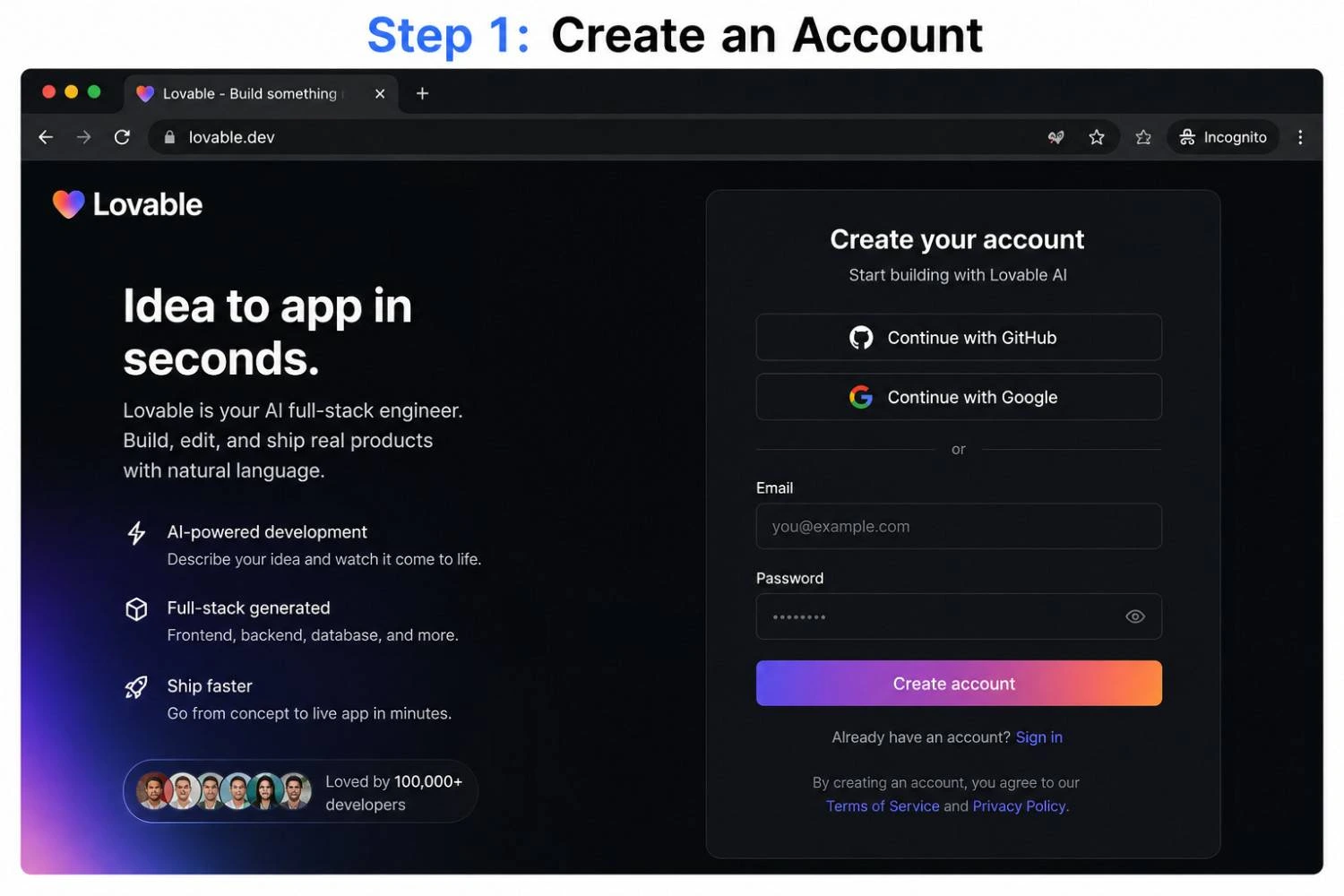
Visit the official Lovable website and create a new account using your preferred sign-in method. After verification, you can access the project dashboard.
Step 2: Start a New Project
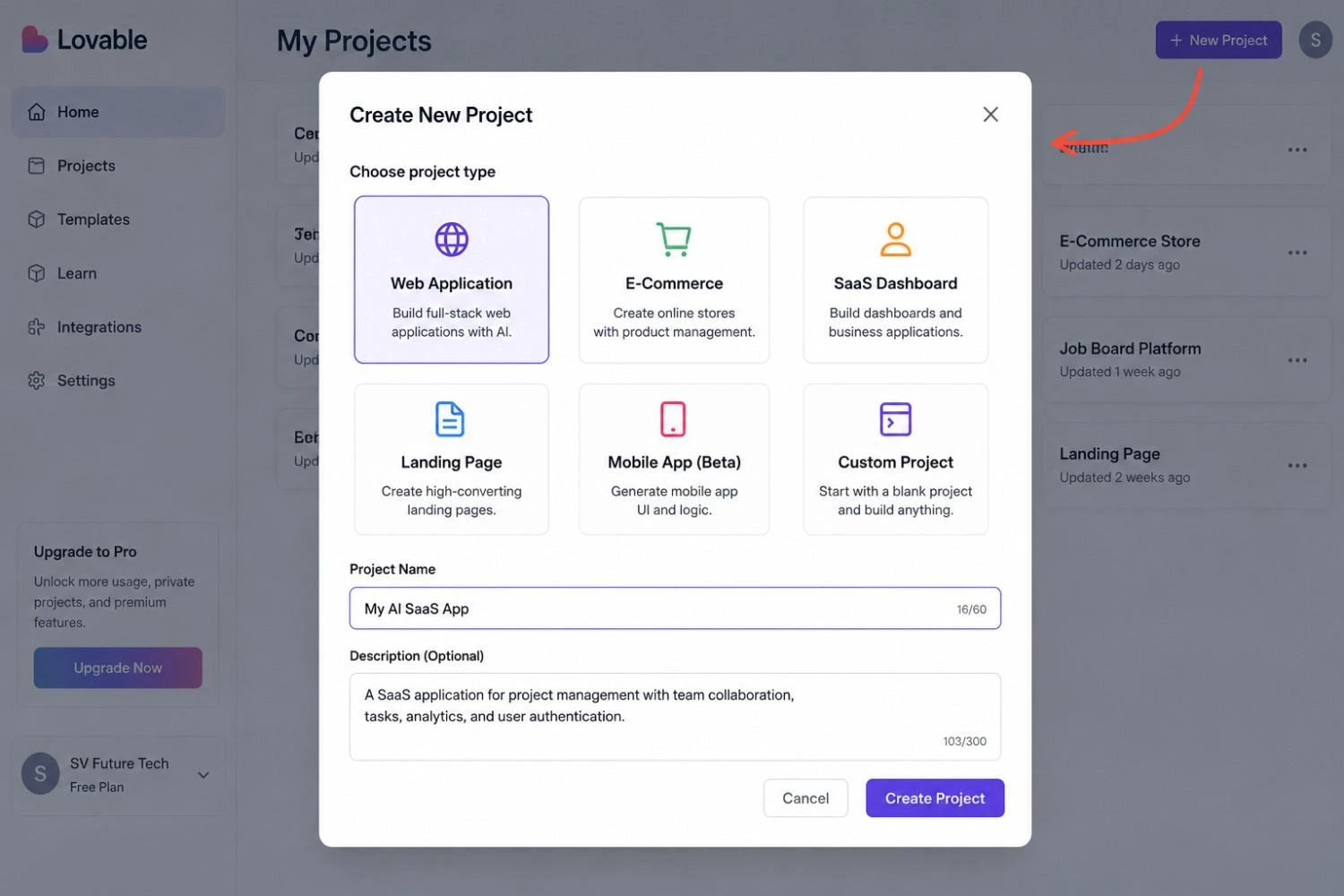
From the dashboard, create a new project and choose the type of application you want to build.
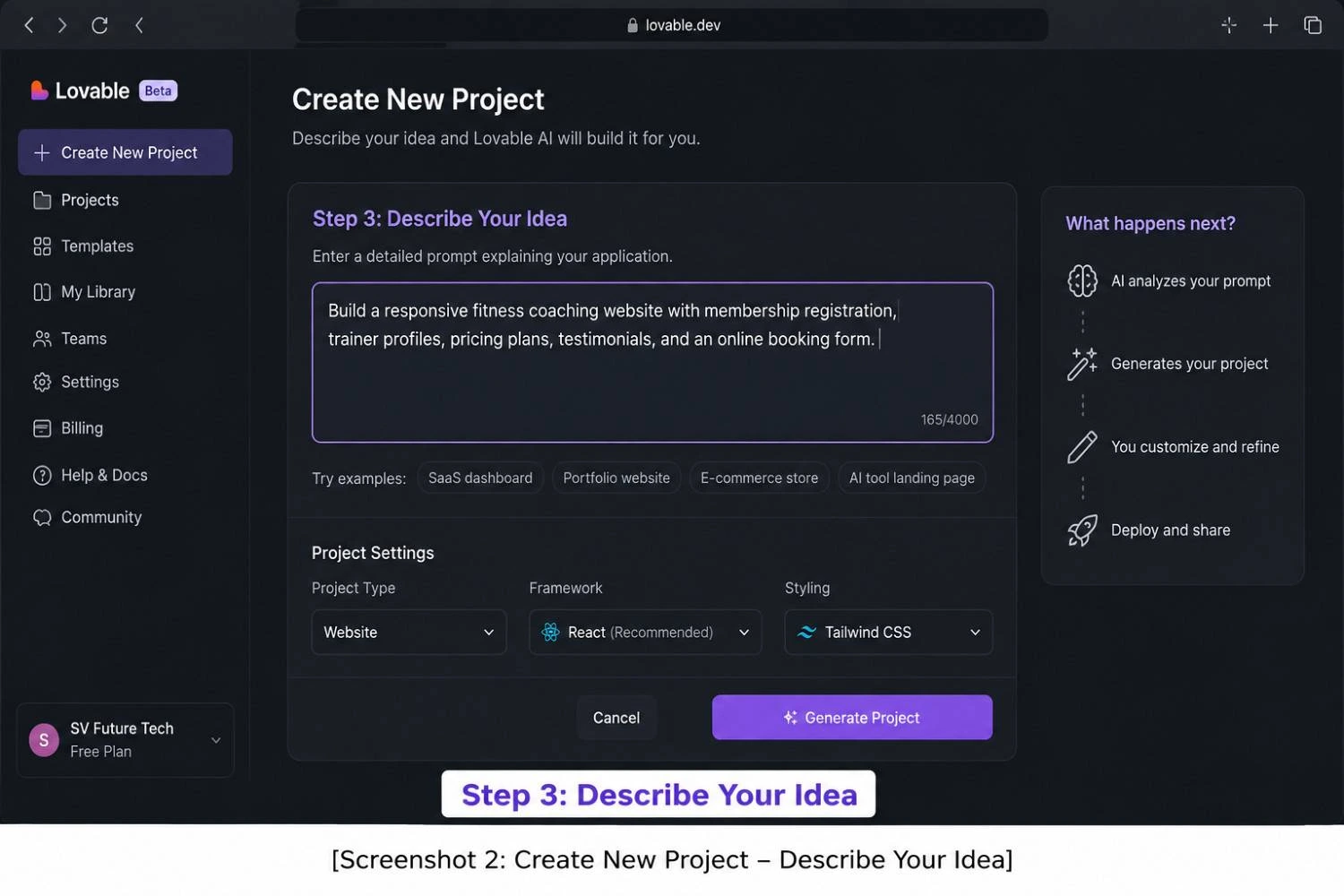
Step 3: Describe Your Idea
Enter a detailed prompt explaining your application.
Example:
"Build a responsive fitness coaching website with membership registration, trainer profiles, pricing plans, testimonials, and an online booking form."
Providing clear instructions usually results in better project generation.
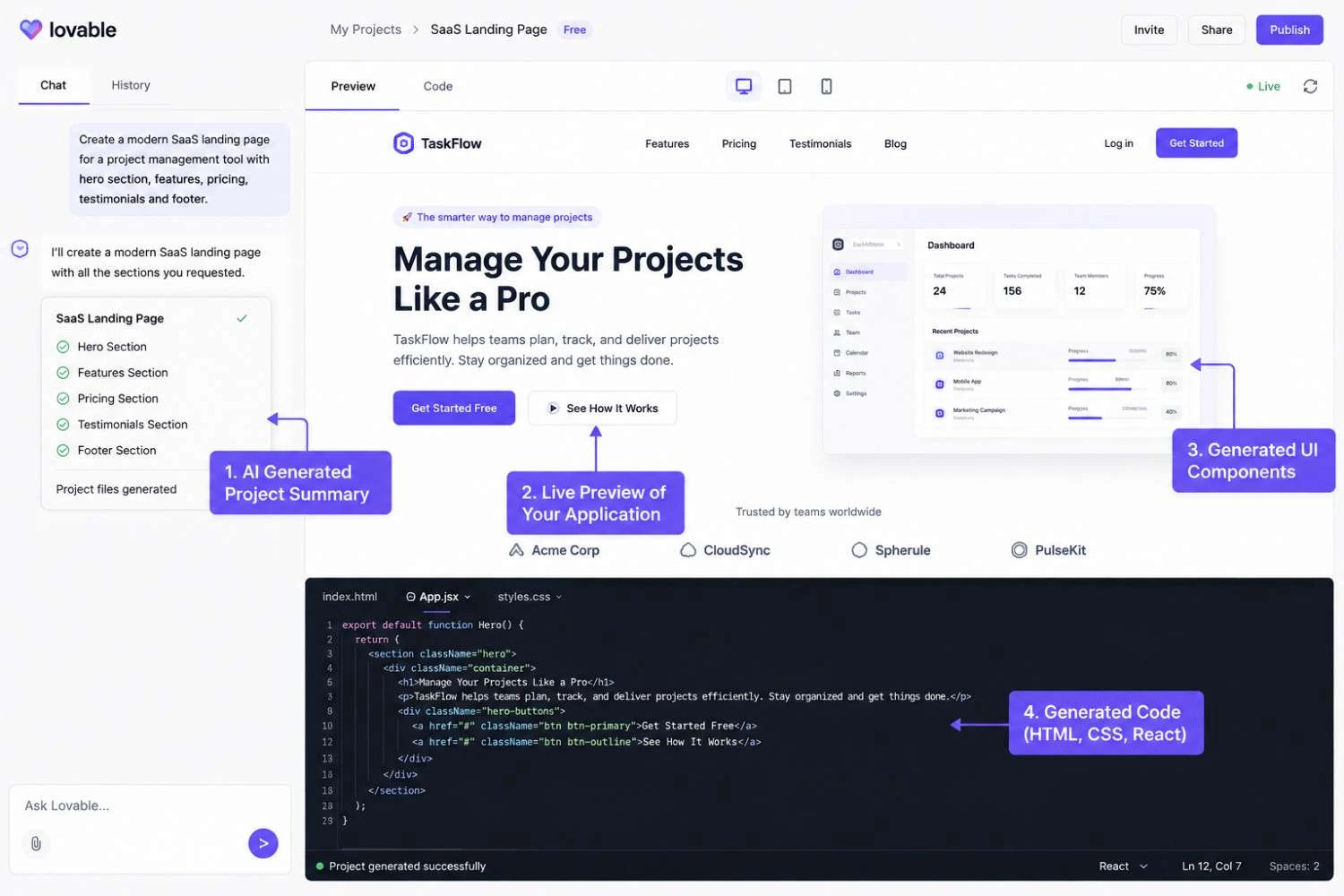
Step 4: Review the Generated Application
Lovable AI will generate an initial version of the project, including layouts and supporting code. Review each section carefully before continuing.
Step 5: Improve the Project
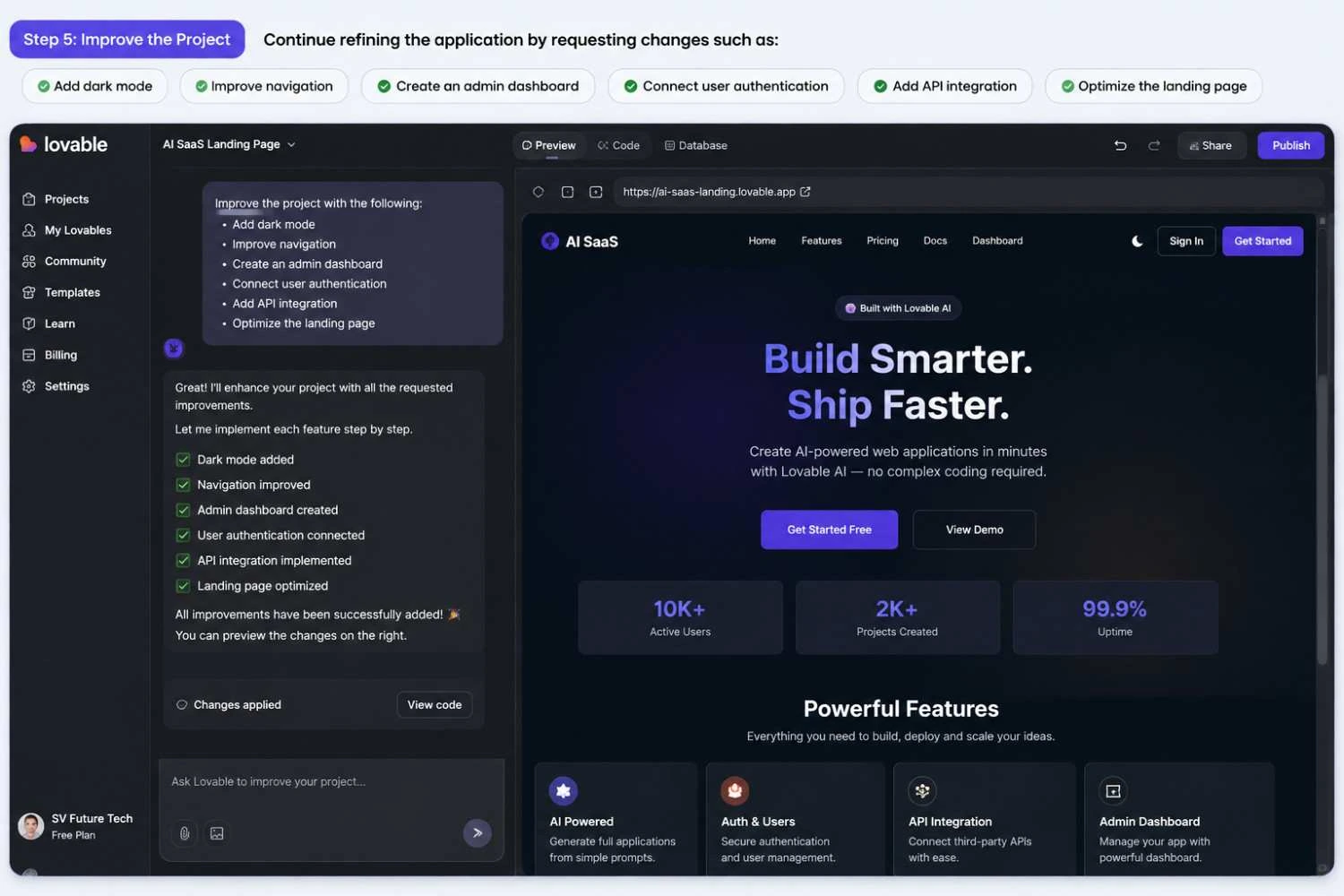
Continue refining the application by requesting changes such as:
- Add dark mode
- Improve navigation
- Create an admin dashboard
- Connect user authentication
- Add API integration
- Optimize the landing page
Iterative improvements generally produce better results than attempting to generate an entire application in one prompt.
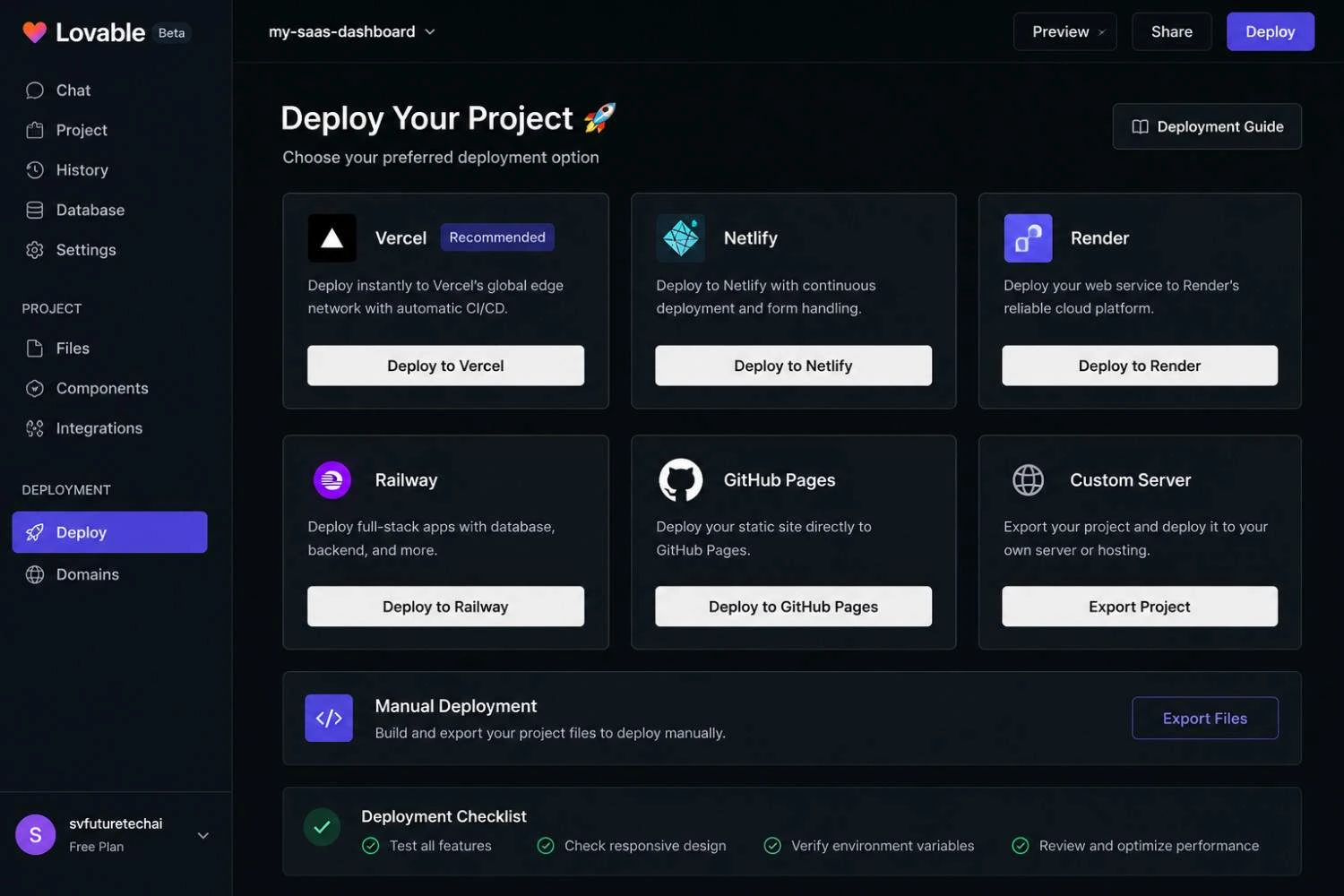
Step 6: Test and Deploy
After verifying functionality and making necessary modifications, prepare the project for deployment using your preferred hosting environment.
Who Should Use It?
Lovable AI is suitable for users who want to accelerate development while maintaining flexibility and control.
It is particularly valuable for:
- Students learning modern web development
- Beginner developers exploring AI-assisted coding
- Freelancers delivering client websites
- Startup founders building MVPs
- SaaS entrepreneurs validating ideas
- Digital agencies improving productivity
- Product managers creating prototypes
- Designers collaborating with developers
- Small businesses building internal tools
Users who already understand HTML, CSS, JavaScript, React, or APIs can often take greater advantage of the platform by extending AI-generated projects with custom functionality.
Who Should Avoid It?
Although Lovable AI is a powerful productivity tool, it may not be the ideal solution for every situation.
It may be less suitable for:
- Developers requiring complete manual control over every line of code
- Organizations with strict compliance or regulatory requirements
- Teams building highly specialized enterprise software
- Users expecting fully production-ready applications without testing
- Beginners who are unwilling to learn basic web development concepts
AI-generated code should always be reviewed, tested, and validated before deployment in production environments.
Pricing Overview
Lovable AI typically offers multiple pricing options designed for different types of users. Plans and pricing may change over time, so always refer to the official website for the latest information.
| Plan | Best For | Typical Features |
|---|---|---|
| Free | Beginners and learners | Limited prompts, basic projects, community access |
| Starter | Individual creators | More AI generations, larger projects, additional customization |
| Pro | Freelancers and professionals | Higher usage limits, advanced features, priority access |
| Team / Enterprise | Businesses and agencies | Team collaboration, administration tools, enhanced support |
Free vs Paid
| Feature | Free Plan | Paid Plan |
|---|---|---|
| AI Project Generation | Limited | Higher limits |
| Number of Projects | Restricted | More projects |
| Prompt Usage | Limited credits | Expanded usage |
| Advanced Features | Partial | Full access |
| Priority Performance | No | Yes |
| Team Collaboration | Limited | Available |
| Business Usage | Basic | Recommended |
| Support | Community | Priority support |
For users who are learning or experimenting with AI-assisted development, the free plan is usually sufficient to understand the platform. Freelancers, agencies, and businesses handling multiple projects often benefit from paid plans because of higher usage limits, enhanced collaboration features, and improved productivity.
Supported Integrations
One of the reasons Lovable AI has become popular among developers is its ability to work alongside modern development tools instead of operating as an isolated platform. Most real-world applications require authentication, databases, APIs, deployment services, analytics, and version control. Lovable AI is designed to fit into these workflows by supporting commonly used integrations.
The availability of specific integrations may change over time, but users can typically connect generated applications with a variety of development services.
Authentication Services
Authentication is essential for applications that require user accounts or secure access.
Common authentication options include:
- Email and Password Authentication
- Social Login Providers
- User Session Management
- Secure Login Workflows
By connecting authentication services, developers can implement secure user access more efficiently instead of creating every login and account management feature from the ground up.
Database Integration
Modern web applications depend on databases to store user information, product catalogs, orders, and business data.
Lovable AI-generated projects can be extended to work with modern databases and Backend-as-a-Service platforms such as:
- Supabase
- PostgreSQL
- Firebase (depending on project architecture)
- REST APIs
- Custom Database Services
This flexibility allows applications to move beyond static pages and become fully interactive systems.
API Connectivity
Many businesses rely on third-party services such as payment gateways, email platforms, maps, or CRM software.
Lovable AI can help generate applications prepared for API integration with services including:
- Stripe
- PayPal
- OpenAI APIs
- Google APIs
- Weather APIs
- CRM Systems
- Email Marketing Platforms
After establishing the connection, developers can modify each integration to match the application's workflow, user experience, and operational requirements.
Version Control
Professional development teams typically use Git-based workflows to manage source code.
Projects generated using Lovable AI can generally be exported and maintained using:
- Git
- GitHub
- GitLab
- Bitbucket
This makes collaboration easier for multiple developers working on the same application.
Deployment Platforms
After development is complete, applications need to be published online.
Depending on the project, deployment options may include:
- Vercel
- Netlify
- Cloud Hosting Providers
- Docker-based Deployments
- Custom Hosting Environments
These deployment options allow applications to move from prototype to production with relatively few additional steps.
Templates
Starting from a blank project can slow down development. Lovable AI helps accelerate the process by generating project structures and reusable layouts suitable for different business scenarios.
Popular template categories include:
Landing Pages
- Startup websites
- Product launches
- Marketing campaigns
- SaaS landing pages
Business Websites
- Company websites
- Agency portfolios
- Restaurant websites
- Healthcare websites
- Educational platforms
Dashboards
- Admin dashboards
- CRM interfaces
- Analytics panels
- Employee management systems
E-Commerce
- Product catalogs
- Shopping interfaces
- Checkout pages
- Customer accounts
SaaS Applications
- Subscription platforms
- Client portals
- Project management tools
- Internal business systems
These templates can significantly reduce the amount of manual design work required at the beginning of a project.
AI Models Used
Lovable AI uses advanced Large Language Models (LLMs) to understand natural language instructions and generate application code. The platform may evolve over time, and the underlying models can change as newer AI technologies become available.
Rather than depending on a single AI model, platforms like Lovable AI often combine multiple AI capabilities for tasks such as:
- Natural language understanding
- Code generation
- UI component creation
- Application planning
- Error correction
- Prompt interpretation
This layered approach helps produce more structured and context-aware application outputs.
Performance
Performance plays an important role in user experience and developer productivity.
Lovable AI generally focuses on reducing development time by automating repetitive coding tasks. Simple prototypes can often be generated within minutes, while larger projects may require additional refinement and testing.
Performance depends on several factors:
- Prompt quality
- Project complexity
- Number of requested features
- External integrations
- Manual customization
For production-ready applications, developers should always optimize:
- Images
- JavaScript bundles
- Database queries
- API requests
- Loading speed
AI can accelerate development, but final performance optimization remains a developer's responsibility.
Security
Security should never be overlooked when using AI-generated code.
Before deploying any application, developers should carefully review:
- Authentication logic
- User permissions
- API security
- Environment variables
- Input validation
- Error handling
- Data encryption
AI can generate a solid starting point, but security reviews, penetration testing, and code audits are still essential for production environments.
Privacy
Applications often process personal or business information, making privacy an important consideration.
Before building projects with Lovable AI, users should:
- Review the platform's privacy policy.
- Understand how prompts and project data are handled.
- Avoid including confidential credentials or sensitive customer information directly in prompts.
- Store API keys securely using environment variables.
- Follow applicable privacy regulations such as GDPR or other regional data protection requirements.
Responsible handling of sensitive information remains the developer's responsibility.
Pros
- Beginner-friendly interface
- Fast application prototyping
- Natural language development
- Reduces repetitive coding
- Supports modern web technologies
- Suitable for startups and freelancers
- Helps accelerate MVP development
- Encourages rapid experimentation
- Can improve developer productivity
- Modern user interface generation
Cons
- AI-generated code may require manual review.
- Complex business logic still needs developer expertise.
- Generated applications often require testing before deployment.
- Some advanced customizations may require programming knowledge.
- Prompt quality directly affects output quality.
- Usage limits may apply on free plans.
Advantages
Using Lovable AI can provide several long-term benefits:
- Faster project delivery
- Lower development costs
- Reduced repetitive work
- Improved idea validation
- Easier collaboration between technical and non-technical teams
- Better productivity for freelancers and agencies
- Faster prototyping for startups
- Accessible entry point for beginners learning web development
Disadvantages
Although AI-assisted development is powerful, there are limitations:
- AI cannot fully replace experienced software engineers.
- Generated code may not always follow project-specific architecture.
- Large enterprise applications usually require significant manual customization.
- AI may misunderstand ambiguous prompts.
- Over-reliance on automation can reduce learning opportunities for beginners.
Understanding these limitations helps developers use the platform more effectively.
Limitations
Before choosing Lovable AI, users should understand its practical limitations.
- Output quality depends heavily on prompt clarity.
- Highly specialized applications may require manual coding.
- Performance tuning is still necessary.
- Security validation must be performed manually.
- AI cannot fully understand unique business requirements without detailed instructions.
- Frequent iteration is often required to achieve the desired result.
Using AI as a development assistant rather than a complete replacement for software engineering generally produces the best outcomes.
Comparison Table
| Feature | Lovable AI | Bolt.new | v0.dev | Replit AI | Cursor AI |
|---|---|---|---|---|---|
| Natural Language App Generation | ✅ | ✅ | ✅ | Limited | Limited |
| AI UI Generation | ✅ | ✅ | ✅ | Partial | Partial |
| Full Project Creation | ✅ | ✅ | Partial | Partial | No |
| Code Editing | ✅ | ✅ | Limited | ✅ | ✅ |
| React Support | ✅ | ✅ | ✅ | ✅ | ✅ |
| API Integration | ✅ | ✅ | Manual | ✅ | Manual |
| Beginner Friendly | ⭐⭐⭐⭐⭐ | ⭐⭐⭐⭐ | ⭐⭐⭐⭐ | ⭐⭐⭐ | ⭐⭐⭐ |
| Rapid MVP Development | Excellent | Excellent | Very Good | Good | Good |
| Best For | Startups, Freelancers, Agencies | Rapid Prototyping | UI Generation | Cloud Development | Professional Coding |
Best Alternatives
Depending on your workflow, several alternatives to Lovable AI are worth exploring.
Bolt.new
Best for developers who want to generate and run full-stack applications quickly through AI-assisted prompts.
v0.dev
An excellent option for generating modern React user interfaces and frontend components with a strong focus on design.
Replit AI
Suitable for cloud-based coding, collaborative development, and experimenting with AI-assisted programming directly in the browser.
Cursor AI
A powerful AI-first code editor designed for developers who prefer writing and editing code within a traditional IDE experience.
GitHub Copilot
Ideal for developers seeking intelligent code suggestions, auto-completion, and productivity improvements inside popular development environments.
Firebase Studio
Useful for developers building applications that rely on Firebase services, authentication, databases, and cloud infrastructure.
Common Mistakes
Although Lovable AI can significantly accelerate application development, many beginners expect it to generate a perfect production-ready application from a single prompt. In reality, AI works best when users provide clear instructions, review the generated output, and continuously refine the project. Avoiding the following common mistakes will help you achieve better results.
1. Writing Vague Prompts
Many users simply type:
"Create a website."
This provides very little context.
Instead, describe your project in detail.
Example:
"Build a responsive SaaS landing page with a pricing section, testimonials, FAQ, contact form, dark mode, user authentication, and a modern blue color scheme."
The more specific your prompt, the more accurate the generated application will be.
2. Expecting Perfect Code Immediately
AI generates an excellent starting point, but every generated application should be reviewed before deployment.
Always verify:
- Business logic
- Navigation
- Forms
- Authentication
- API calls
- Responsive layouts
Think of AI as a junior developer assisting your project rather than replacing the entire development process.
3. Ignoring Security
Generated applications should never be published without reviewing:
- Authentication
- Authorization
- Environment variables
- API keys
- User permissions
- Database queries
- Input validation
Security remains a shared responsibility between developers and platform providers.
4. Skipping Testing
Many beginners publish applications immediately after generation.
Instead, test:
- Desktop
- Mobile
- Tablet
- Multiple browsers
- Forms
- Login system
- API responses
- Error handling
Testing helps identify issues before users encounter them.
5. Depending Entirely on AI
Think of AI as a development companion rather than a complete substitute for technical knowledge. The strongest results usually come from combining AI-generated solutions with a solid understanding of modern web development concepts.
Learning HTML, CSS, JavaScript, React, APIs, and basic backend concepts will help you customize AI-generated projects more effectively and solve problems independently.
Expert Tips
Professionals who use AI-assisted development productively usually follow a structured workflow instead of trying to build everything in one step.
Break Large Projects into Smaller Tasks
Instead of requesting an entire SaaS platform at once, build the project incrementally:
- Homepage
- Authentication
- Dashboard
- User Profile
- Payments
- Reports
- Admin Panel
This approach usually produces cleaner and more maintainable results.
Improve Prompts Gradually
Treat prompts like design specifications.
Each iteration should improve the previous version rather than replacing it completely.
Keep Version Backups
After every major improvement, save a working version of the project.
Keep regular backups or commit project milestones frequently so you can safely return to a stable version whenever an experiment produces unwanted results.
Review Every AI Suggestion
Even when AI generates valid code, review it for:
- Readability
- Performance
- Security
- Maintainability
Human oversight remains an essential part of professional software development.
Learn While Building
Instead of simply accepting generated code, spend time understanding how different components work. This helps you become a better developer while benefiting from AI-assisted productivity.
Business Ideas
Lovable AI opens opportunities for building digital businesses with relatively low startup costs.
Popular ideas include:
AI Website Development Agency
Offer professional website creation services for:
- Restaurants
- Doctors
- Real Estate Agencies
- Gyms
- Schools
- Local Businesses
SaaS Product Development
Build subscription-based software such as:
- CRM Systems
- Appointment Booking Platforms
- Inventory Management
- HR Portals
- Customer Dashboards
Startup MVP Development
Help entrepreneurs convert business ideas into working prototypes for investor presentations and customer validation.
Internal Business Automation
Develop tools for businesses such as:
- Employee Management Systems
- Reporting Dashboards
- Invoice Portals
- Customer Support Panels
Template Marketplace
Design reusable website templates and UI components that can be customized for different industries.
Freelancing Opportunities
Freelancers can use Lovable AI to increase productivity and deliver projects faster without compromising quality.
Popular freelance services include:
- Landing Page Development
- Business Website Creation
- SaaS Dashboard Design
- Admin Panel Development
- AI Prototype Development
- Frontend Development
- Website Redesign
- AI-Powered Internal Tools
- Startup Consulting
Freelance platforms where these services are commonly offered include:
- Upwork
- Fiverr
- Freelancer
- Toptal
- Contra
- Direct Client Outreach
By combining AI-assisted development with strong communication and problem-solving skills, freelancers can complete more projects while maintaining high standards.
How to Make Money Using Lovable AI
Lovable AI is not only a development tool—it can also support multiple income streams.
Build Client Websites
Create websites for local businesses and charge for design, development, deployment, and ongoing maintenance.
Develop SaaS Products
Create subscription-based applications that generate recurring monthly revenue.
Examples:
- Booking Systems
- CRM Software
- AI Productivity Tools
- Membership Platforms
Sell Digital Templates
Create customizable website kits or application starter projects tailored to different business sectors—such as medical clinics, schools, property agencies, restaurants, fitness centers, or online stores—and offer them through your own platform or trusted digital marketplaces.
Offer Consulting Services
Guide businesses in adopting AI-assisted development workflows and improving digital productivity.
Teach AI Development
Create:
- Online Courses
- Workshops
- YouTube Tutorials
- Blog Articles
- Premium Learning Communities
Educational content can generate income through advertising, sponsorships, affiliate marketing, and course sales.
SEO Tips
If you're building websites or applications with Lovable AI, remember that technical quality alone doesn't guarantee search visibility. Consider these SEO best practices:
- Use descriptive page titles and meta descriptions.
- Create clean, readable URLs.
- Organize every article with a logical heading hierarchy so readers and search engines can easily understand the relationship between major topics and supporting sections.
- Give every image a meaningful filename and write informative alternative text that accurately describes its content, helping both accessibility tools and search engines understand the visual.
- Improve Core Web Vitals by reducing unnecessary scripts and optimizing media.
- Add structured data (Schema.org) where appropriate.
- Ensure mobile responsiveness across devices.
- Publish original, helpful content that addresses real user questions.
- Build internal links between related pages.
- Monitor performance using analytics and search console tools.
Combining good development practices with sound SEO principles increases the chances of attracting sustainable organic traffic.
Final Verdict
Lovable AI represents an important step forward in AI-assisted software development. Rather than replacing developers, it provides a practical way to accelerate repetitive tasks, generate application foundations, and shorten the journey from concept to prototype.
For beginners, it offers an accessible introduction to modern web application development. For experienced developers, it serves as a productivity tool that can reduce boilerplate work and accelerate project delivery. Freelancers, agencies, startup founders, and businesses can also benefit by using Lovable AI to validate ideas, build MVPs, and deliver projects more efficiently.
However, users should approach AI-generated applications with realistic expectations. Careful review, testing, security validation, and ongoing refinement remain essential before deploying any production system.
When combined with strong development knowledge and thoughtful project planning, Lovable AI can become a valuable addition to a modern software development workflow.
Conclusion
The way applications are built is evolving rapidly, and AI-assisted development platforms like Lovable AI are helping make software creation more accessible than ever before. By combining natural language prompts with modern development practices, the platform enables users to move from an idea to a working application in significantly less time than traditional workflows.
Whether you're a student learning web development, a freelancer delivering client projects, a startup founder building an MVP, or a business owner exploring digital transformation, Lovable AI provides a practical environment for experimenting, prototyping, and developing web applications more efficiently.
While AI can automate many repetitive tasks, long-term success still depends on thoughtful planning, continuous learning, code review, security best practices, and understanding the needs of real users. Those who treat AI as a collaborative development assistant rather than a complete replacement for technical expertise are likely to achieve the best results.
About SV Future Tech AI
At SV Future Tech AI, we simplify complex technologies by publishing practical guides on Artificial Intelligence, AI tools, programming, automation, digital business, freelancing, and emerging technologies. Every article is researched from reliable sources, refined with AI-assisted workflows, and carefully reviewed by humans to provide accurate, easy-to-understand, and actionable information.
Our mission is to help students, developers, professionals, entrepreneurs, and technology enthusiasts build future-ready skills, discover new digital opportunities, and confidently navigate the rapidly evolving AI landscape. Whether you're exploring your first AI tool or launching your next software product, SV Future Tech AI is committed to supporting your learning journey with trustworthy and practical content.